
Foreplay Download Guide: Mobile App, Extension & Access
If you are searching for a "Foreplay download," you are likely trying to get the ad creative and swipe file tool onto your phone, desktop, or browser. Foreplay is a platform that helps marketers save ads from Facebook Ad Library, TikTok, and other sources, organize them into boards, and share them with a team. This guide covers the real download options, how each one works, and how to avoid a common mix-up with an unrelated app that shares the same name.
What the Foreplay download actually includes
Foreplay Download Guide: Mobile App, Extension & Access - What the Foreplay download actually includes.
Foreplay is primarily a web-based tool, but it offers two practical ways to use it beyond the browser tab:
- Foreplay mobile app for iOS and Android, so you can save ads and creative inspiration while scrolling on your phone.
- Foreplay Chrome extension, which lets you save ads directly from supported ad libraries and websites on desktop.
There is no separate Windows or Mac desktop installer. The web app plus the browser extension covers desktop use.
Foreplay mobile app: iOS and Android
Foreplay Download Guide: Mobile App, Extension & Access - Foreplay mobile app: iOS and Android.
The mobile app is designed for capturing inspiration wherever it appears. According to Foreplay's own mobile app page, you can save content from your phone, snap a photo to add offline or out-of-home advertising to your swipe file, and browse millions of ads with search and filters.
How to get the mobile app
- Open the App Store on iPhone or iPad, or Google Play on Android.
- Search for Foreplay and confirm the developer is the ad creative tool, not a couples game.
- Install the app and sign in with the same account you use on the web.
- Grant photo and camera permissions if you want to snap and save billboard or print inspiration.
What you can do in the mobile app
- Save ads from Instagram and other apps via the share sheet.
- Photograph a billboard, flyer, or print ad and save it to a swipe file.
- Search and filter a large library of ads for inspiration.
- Add saved items to boards that sync with your desktop account.
Foreplay Chrome extension: save ads from Ad Libraries
Foreplay Download Guide: Mobile App, Extension & Access - Foreplay Chrome extension: save ads from Ad Libraries.
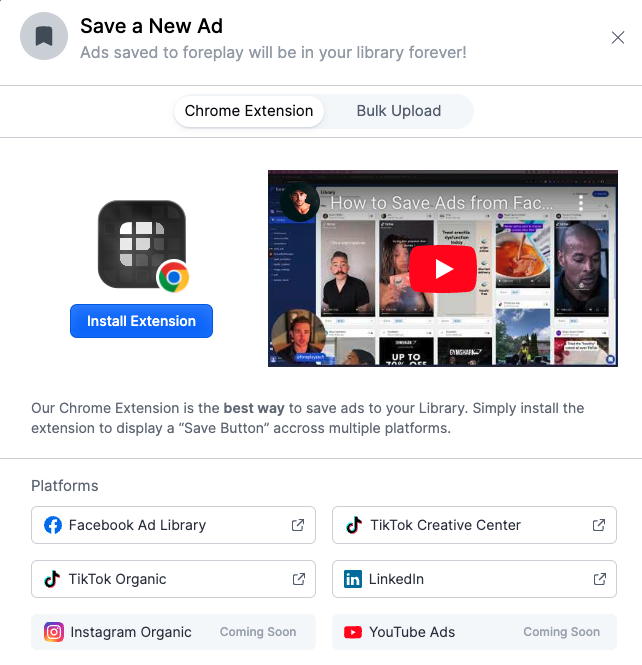
On desktop, the extension is the fastest path from an ad library to your swipe file. Foreplay's homepage describes saving ads from the Facebook Ad Library and TikTok as a core part of its workflow.
How to install the extension
- Go to the Chrome Web Store.
- Search for Foreplay and check that the listing matches the ad creative tool.
- Click Add to Chrome and confirm the permissions.
- Pin the extension so it is visible in your toolbar.
- Open Facebook Ad Library or TikTok, find an ad, and use the extension to save it to a board.
Why the extension matters for research
Saving an ad is only useful if you can find it again. The extension lets you capture the creative, the advertiser, and the context in one step, which keeps your research organized instead of scattered across screenshots and group chats.
Don't confuse Foreplay with The Foreplay Game
The search term "Foreplay download" also surfaces an unrelated app called The Foreplay Game, an interactive couples game with truth-or-dare style challenges. It is a completely different product from the ad creative platform.
Here is how to tell them apart:
| Signal | Foreplay (ad creative tool) | The Foreplay Game |
|---|---|---|
| Purpose | Save and organize ads for creative research | Couples game with challenges and questions |
| Platforms | Web, iOS, Android, Chrome extension | iPhone, iPad, and web |
| Android availability | Yes | No, due to Google Play policies |
| Typical user | Marketers, agencies, creative teams | Couples and groups |
If you want to save ads from Facebook Ad Library, you want the first one. If you want a game for date night, you want the second. Checking the app description before installing will save you a wasted download.
Foreplay download vs. other ad research tools
Foreplay is strong at saving, organizing, and sharing creative. It is not a full ad spy platform with spend estimates, reach data, and duplicate tracking. If your goal is to understand what competitors are spending and which ads are scaling, you need a different category of tool.
That is where an ad intelligence platform comes in. PrimeSpy is a multi-platform ad spy tool for Facebook, TikTok, and Meta Ad Library that focuses on smart search by keyword, URL, or advertiser, advanced ad filters, and metrics like reach, spend, and duplicates. It also surfaces daily top products and ad trackers. In practice, the two tools solve different problems:
- Foreplay answers: "How do I collect and share great creative?"
- PrimeSpy answers: "Which ads are actually working, and what are competitors spending?"
Many teams use both: spy tools to find proven ads, and a swipe file tool to organize the creative they want to brief or test. If you are comparing options, this PrimeSpy vs Niche Scraper vs Pipiads breakdown covers how ad spy tools differ on coverage, product research, and pricing.
Practical setup checklist after you download
Once the app or extension is installed, a few small steps make it useful fast:
- Create your first board. Name it after a campaign, client, or product category.
- Set up a sharing link. Invite teammates so they can add and review ads.
- Save five ads from Facebook Ad Library. This tests the extension workflow end to end.
- Save one ad from your phone. This confirms the mobile share sheet or camera capture works.
- Connect your research to performance data. A swipe file shows what looks good; ad metrics show what is working. Pairing creative research with ad campaign tracking helps you connect the two.
Common Foreplay download questions
Is Foreplay free to download?
Foreplay offers a free starting point, with paid plans for teams that need more seats and features. Check the official pricing page for current limits.
Does Foreplay have a desktop app?
No standalone desktop installer is offered. Desktop users rely on the web app and the Chrome extension.
Can I download ads from Foreplay?
You can save and organize ads inside Foreplay. If you need to download creative files at scale for analysis or archiving, check whether your plan supports it, or use a dedicated ad spy tool with unlimited creative downloads.
Why does a couples game show up when I search Foreplay download?
Because two unrelated products share the name. The ad creative tool is Foreplay.co; the couples game is The Foreplay Game. Match the developer and description before installing.
Is there an Android version of Foreplay?
The ad creative tool offers an Android app. The Foreplay Game does not, due to Google Play Store policies.
Related reading
- Dropship Login: Sign In, Reset Password & Fix Access - Find the Dropship login page, sign in with Google, Apple, or email, reset a forgotten password, and troubleshoot common access issues fast.
- Pipiads Features: 2026 Guide to TikTok & Meta Ad Spy Tools - Explore Pipiads features in 2026: ad library, TikTok Shop analytics, advertiser tracking, pricing, and how it compares to PrimeSpy for ad research.
Sources and further reading
- Foreplay | The Complete Winning Ad Workflow - Save ads from Ad Libraries - From advertising inspiration to creative analytics. The best way to save ads from TikTok, and Facebook Ad Library, organize and share with your team.
- Foreplay Mobile App - iOS & Android | Save Ads on the Go - Use Foreplay for creative inspiration anywhere—whether on Instagram or admiring a billboard. Foreplay's mobile app is your creative sidekick.
- The Foreplay Game - Intimate Games & Challenges for Couples - An interactive app for couples to ignite desire and explore sensual adventures through playful challenges. Try Truth or Dare, Wheel of Kinks, Erotic Bingo & more!
Conclusion
The Foreplay download is straightforward once you know what you are looking for: a mobile app for iOS and Android, plus a Chrome extension for desktop ad saving. The main pitfall is the name collision with an unrelated couples game, so verify the developer before you install. If your goal is creative organization, Foreplay fits. If your goal is knowing which competitor ads are winning and what they cost, pair it with an ad intelligence tool like PrimeSpy and let each do the job it was built for.